Key Takeaways
Knowing when to switch fire department software can mean the difference between seamless NERIS compliance and a data management crisis.
- Legacy RMS platforms often lack ePCR integration, mobile access, and modern reporting capabilities that today’s departments require
- The January 2026 NERIS mandate created an urgent deadline for departments still using systems built for NFIRS-era reporting
- Signs your RMS is outdated include manual data re-entry, limited analytics, poor vendor support, and inability to meet current compliance standards
If your software creates more problems than it solves, exploring fire RMS alternatives isn’t disloyal—it’s responsible leadership.
Fire chiefs and administrative officers tend to develop a complicated relationship with their records management software. You’ve invested years into learning its quirks, building workarounds for its limitations, and training staff on its interface. Even when frustrations mount, the thought of switching feels overwhelming. But here’s the reality: the fire service technology landscape has evolved dramatically, and clinging to an outdated system can cost your department more than you realize.
Determining when to switch fire department software isn’t about chasing shiny new features. It’s about recognizing when your current platform actively hinders your mission. The National Emergency Response Information System (NERIS) transition, which launched in January 2026, fundamentally changed what departments need from their RMS. If your system wasn’t built with modern data standards in mind, you may already be experiencing the consequences.
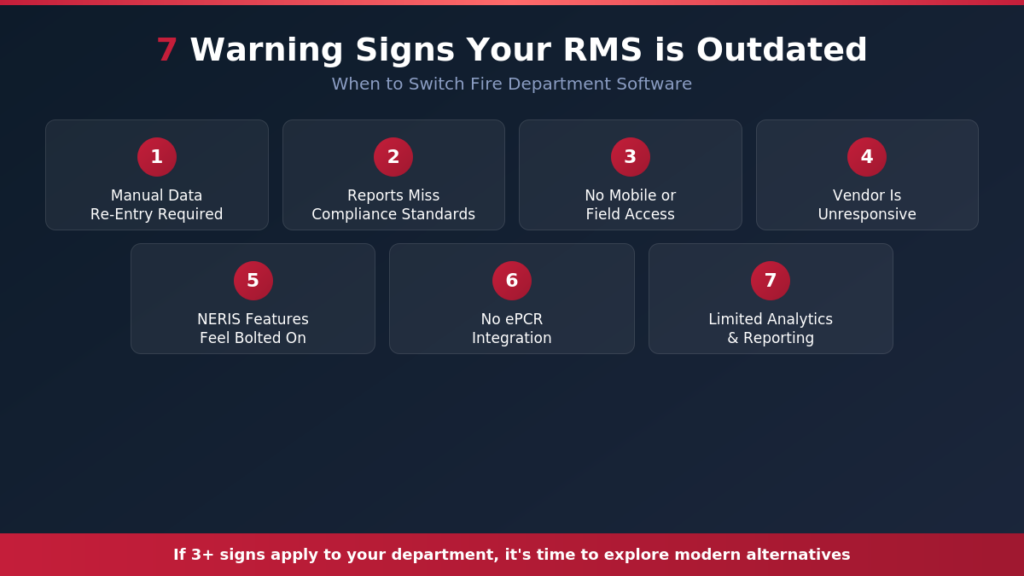
When to Switch Fire Department Software: What Are the Warning Signs Your RMS Is Outdated?
Most departments don’t wake up one day and decide their software has failed them. The signs accumulate gradually until they become impossible to ignore. Understanding these red flags can help you determine whether it’s time to explore fire RMS alternatives before a crisis forces the decision.
Your System Requires Constant Manual Data Re-Entry
Modern RMS platforms connect seamlessly with CAD systems, ePCR software, and training databases. If your staff manually enters the same information into multiple systems, that’s a clear sign your technology hasn’t kept pace. The U.S. Fire Administration emphasizes that data quality directly impacts a department’s ability to make informed operational decisions, and manual processes dramatically increase error rates while consuming valuable administrative time.
Double data entry isn’t merely inefficient. Every manual keystroke introduces error potential. When incident reports contain conflicting information because someone transposed numbers or forgot to update a field, your department’s credibility suffers during accreditation reviews, insurance audits, and grant applications.
Your Reports Don’t Meet Current Compliance Standards
The shift from NFIRS to NERIS represents the most significant change in fire reporting standards in decades. NERIS requires new data elements, different validation rules, and updated submission formats. If your current RMS vendor scrambled to patch compliance features onto legacy architecture, you may be experiencing validation errors, rejected submissions, or simply missing required data fields entirely.
Signs your RMS is outdated become especially apparent during compliance reporting. Do you spend hours manually checking reports before submission? Does your system flag errors only after you’ve completed the entire report? Can you easily generate the demographic and outcome data that NERIS now requires? If these questions make you uncomfortable, your platform may be fundamentally inadequate for current requirements.
You Can’t Access Critical Information in the Field
Mobile functionality has transitioned from luxury to necessity. Firefighters and officers need real-time access to pre-plans, hydrant data, property information, and incident history while on scene. If your system only works on desktop computers at the station, you’re operating with one hand tied behind your back.
The best fire department records management solutions now offer browser-based access that works on tablets, laptops, and smartphones without requiring special apps or VPN connections. If your current system demands complex technical setups for field access, that’s valuable time your crews aren’t spending on actual emergency response.

Your Vendor Has Become Unresponsive
Software relationships work both ways. When you report bugs or request support, does your vendor respond promptly? Have they communicated clearly about NERIS updates and compliance timelines? Are they actively developing new features, or has development essentially stopped?
Some legacy RMS vendors have signaled, either explicitly or through inaction, that they’re not investing in future development. If your vendor meetings feel more like hostage negotiations than partnerships, that relationship has likely run its course. The fire service deserves technology partners who understand emergency services and remain committed to continuous improvement.
How Has NERIS Changed When to Switch Fire Department Software?
The NERIS transition created a natural inflection point for every fire department in the country. Agencies that proactively evaluated their systems before January 2026 made smoother transitions. Those still running legacy platforms may now face the worst of both worlds: compliance headaches and the eventual need to switch anyway.
New Data Requirements Expose Platform Limitations
NERIS requires information that many older RMS platforms simply weren’t designed to capture. Enhanced demographic data, more detailed property characteristics, and standardized outcome tracking all demand database architectures that legacy systems often lack. Rather than properly implementing these requirements, some vendors have resorted to awkward workarounds that create usability problems and data integrity issues.
When evaluating whether your system meets current needs, consider whether NERIS fields integrate naturally into your workflow or feel like afterthoughts bolted onto an existing interface. Seamless integration suggests a platform designed for modern requirements. Clunky implementation often indicates fundamental architectural limitations that won’t improve with patches.
Reporting Interoperability Has Become Essential
NERIS emphasizes data sharing and interoperability in ways NFIRS never did. Your RMS should facilitate easy data exchange with mutual aid partners, regional authorities, and state fire marshal offices. If sharing information with neighboring departments requires manual exports, format conversions, or custom programming, you’re losing efficiency that modern platforms provide automatically.
The National Fire Protection Association has consistently emphasized data-driven decision making as essential for fire service improvement. That vision requires systems capable of producing clean, standardized data that aggregates meaningfully across jurisdictions. Legacy platforms often create data silos that undermine these broader fire service goals.
What Should You Look for in a Modern RMS?
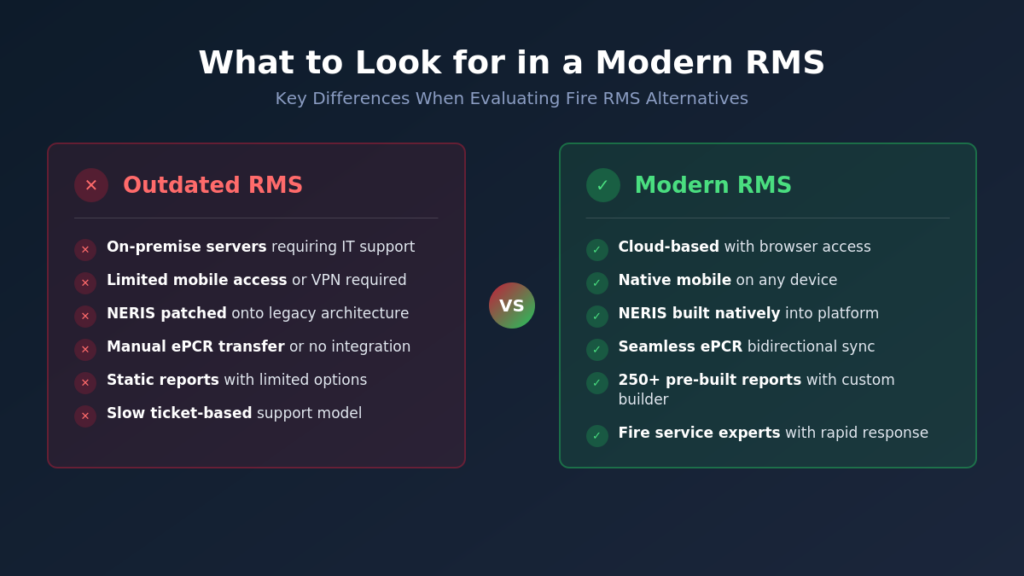
Understanding the characteristics of contemporary platforms helps clarify whether your current system measures up. The gap between what modern fire RMS alternatives offer and what legacy systems provide has never been wider.
| Feature | Outdated RMS | Modern RMS |
| Deployment | On-premise servers requiring IT support | Cloud-based with browser access |
| Mobile Access | Limited or requires VPN/special software | Native browser access on any device |
| NERIS Compliance | Patched onto existing architecture | Built natively for current standards |
| ePCR Integration | Manual data transfer or none | Seamless bidirectional sync |
| Reporting | Static, pre-defined reports only | Custom analytics with 250+ templates |
| Support Model | Ticket-based with slow response | Fire service professionals with rapid response |
| Updates | Infrequent, major version releases | Continuous updates, automatic deployment |
Cloud-Based Architecture Eliminates Infrastructure Headaches
Modern platforms operate entirely in the cloud, eliminating the need for on-site servers, manual backups, and IT infrastructure maintenance. Your department accesses the system through standard web browsers, which means any device with internet connectivity becomes a workstation.
Cloud deployment also ensures everyone runs the same software version simultaneously. When the vendor releases compliance updates or new features, they deploy automatically without requiring your IT staff to schedule downtime or manage installations. This approach proves especially valuable for volunteer departments that lack dedicated technical personnel.
Integrated Fire and EMS Functionality Reduces Complexity
Departments that provide both fire and EMS services often struggle with separate systems that don’t communicate. Modern platforms offer integrated incident reporting, electronic patient care reporting, and unified analytics across all response types.
Integration extends beyond mere data sharing. Truly unified platforms allow crews to begin incident documentation on scene and have that information automatically populate relevant EMS records. Supervisors can review combined operational metrics rather than piecing together separate reports from disconnected systems.
Pre-Built Reports Accelerate Decision Making
Administrative officers frequently spend excessive time building custom reports to answer basic operational questions. Modern RMS platforms come equipped with extensive report libraries covering common fire service needs, from ISO documentation to grant applications to accreditation requirements.
Look for systems offering 250 or more pre-built reports alongside intuitive custom report builders. The combination means you’ll rarely encounter a reporting need the platform can’t address, whether through existing templates or straightforward customization tools.
Five Questions to Ask Before Making the Switch
Deciding when to switch fire department software requires honest assessment of your current situation and realistic evaluation of alternatives. These questions help frame that analysis.
- What’s the total cost of staying? Calculate staff time spent on workarounds, compliance risks from inadequate reporting, and opportunity costs of missing features. The switching costs may be lower than the staying costs.
- Will historical data migrate cleanly? Quality vendors provide comprehensive data migration services that preserve your reporting history. Never assume you must abandon years of records when transitioning platforms.
- How does vendor support actually work? Request references from similar-sized departments and ask specifically about support responsiveness during critical periods like year-end reporting or major compliance transitions.
- What’s the implementation timeline? Understand realistic deployment schedules, training requirements, and what support you’ll receive during transition. Quality vendors provide dedicated implementation teams rather than leaving you to figure things out independently.
- Is the platform evolving? Review the vendor’s development roadmap and recent feature releases. Active development indicates a company investing in their product’s future. Stagnation suggests you’ll face this same decision again in a few years.
How Do You Manage the Transition Successfully?
The prospect of data migration often creates the most anxiety when considering fire RMS alternatives. Departments worry about losing historical records, disrupting ongoing operations, or overwhelming staff with new training requirements. These concerns are legitimate, but they’re also manageable with proper planning.
Partner with Vendors Who Specialize in Fire Service Transitions
Generic software companies often underestimate the complexity of fire department data. Vendors with deep fire service expertise understand NFIRS/NERIS data structures, recognize common data quality issues in historical records, and know how to map legacy formats to modern standards.
The best migration partners have processed countless transitions and developed refined methodologies for preserving data integrity while improving data quality. They’ll identify potential issues before they become problems and provide realistic timelines based on actual experience with similar departments.
Plan for Training That Respects Operational Demands
Fire departments can’t shut down operations for weeks of classroom training. Effective implementation plans work around shift schedules, provide role-specific training modules, and offer ongoing support as staff encounter real-world questions.
Modern platforms also tend to feature more intuitive interfaces than legacy systems, reducing the overall training burden. When software follows logical workflows that mirror how firefighters actually document incidents, adoption happens more naturally.
Frequently Asked Questions
How long does it typically take to switch fire department software? Implementation timelines vary based on department size and data complexity, but most transitions complete within 60 to 90 days. This includes data migration, system configuration, and staff training. Quality vendors provide dedicated project managers who maintain momentum and address issues promptly throughout the process.
Will we lose our historical incident data when switching RMS platforms? Reputable vendors provide comprehensive data migration services specifically designed to preserve historical records. Your NFIRS and NERIS reports, training documentation, inspection histories, and other critical data transfer to the new system. Always confirm migration scope and methodology before signing any contract.
What happens if we wait to switch until our current contract expires? Waiting carries risks, particularly regarding compliance. If your current system can’t meet NERIS requirements effectively, you’re accumulating data quality problems that become harder to correct over time. Additionally, transitioning during contract renewal periods often creates unnecessary time pressure. Evaluating alternatives now gives you leverage regardless of when you ultimately decide to move forward.
How do we convince budget decision-makers that switching is worthwhile? Focus on total cost of ownership rather than subscription fees alone. Document staff hours spent on workarounds, quantify compliance risks, and calculate the value of features your current system lacks. Most departments find that modern platforms cost less than legacy systems when accounting for infrastructure, IT support, and administrative inefficiency.
Take the Next Step Toward Modern Records Management
Recognizing the signs your RMS is outdated represents the first step toward improvement. If multiple items from this article resonated with your department’s experience, the time for exploration has arrived. Delaying the evaluation only extends the period your crews struggle with inadequate tools.
EPR Fireworks delivers cloud-based records management built by fire service professionals who understand operational realities. With native NERIS compliance, integrated ePCR capabilities, 270+ pre-built reports, and dedicated migration support that ensures no lost data, transitioning to modern software becomes a manageable project rather than an overwhelming crisis. Schedule a conversation today to discuss how your department can finally get the RMS it deserves.