- Whiteboards still work without power, and every officer already knows how to read one.
- A digital incident command board shares one live board across every device on the incident.
- PARs, Maydays and command transfers are time-stamped and logged as they happen, not rebuilt later.
- When the board is tied to the incident record, benchmark times and tactical actions reach the report without re-entry.
Many command posts run on a whiteboard, with magnets for units, dry-erase for divisions and a tactical worksheet for times. A digital incident command board does the same job on a tablet, but every device on the incident sees it. The board also keeps the record as the fire unfolds.
This post walks a working fire from arrival to the report. At each moment, we compare the whiteboard with a digital board. Then we look at what changes when the board is connected to the incident record.
What Is a Digital Incident Command Board?
Whether you call it an ICS command board or a fire command board, the questions are the same. Who is where, is everyone accounted for, and what goes in the report?
An incident command board is where Command tracks who is on scene and what each crew is doing. On a whiteboard, that picture lives in one place. Only people standing at the tailboard can read it.
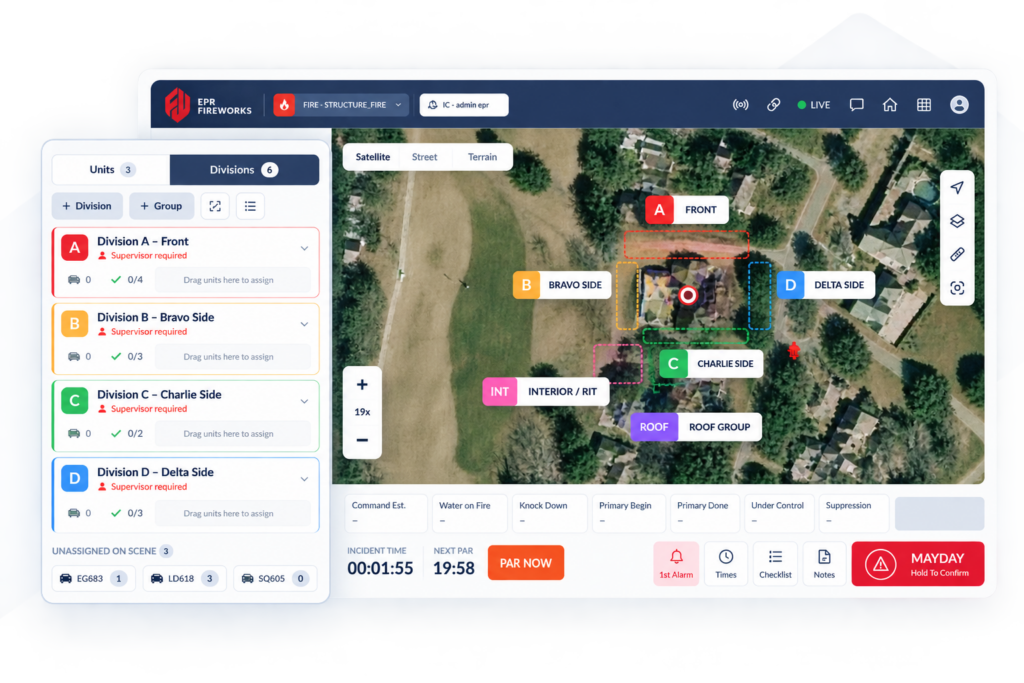
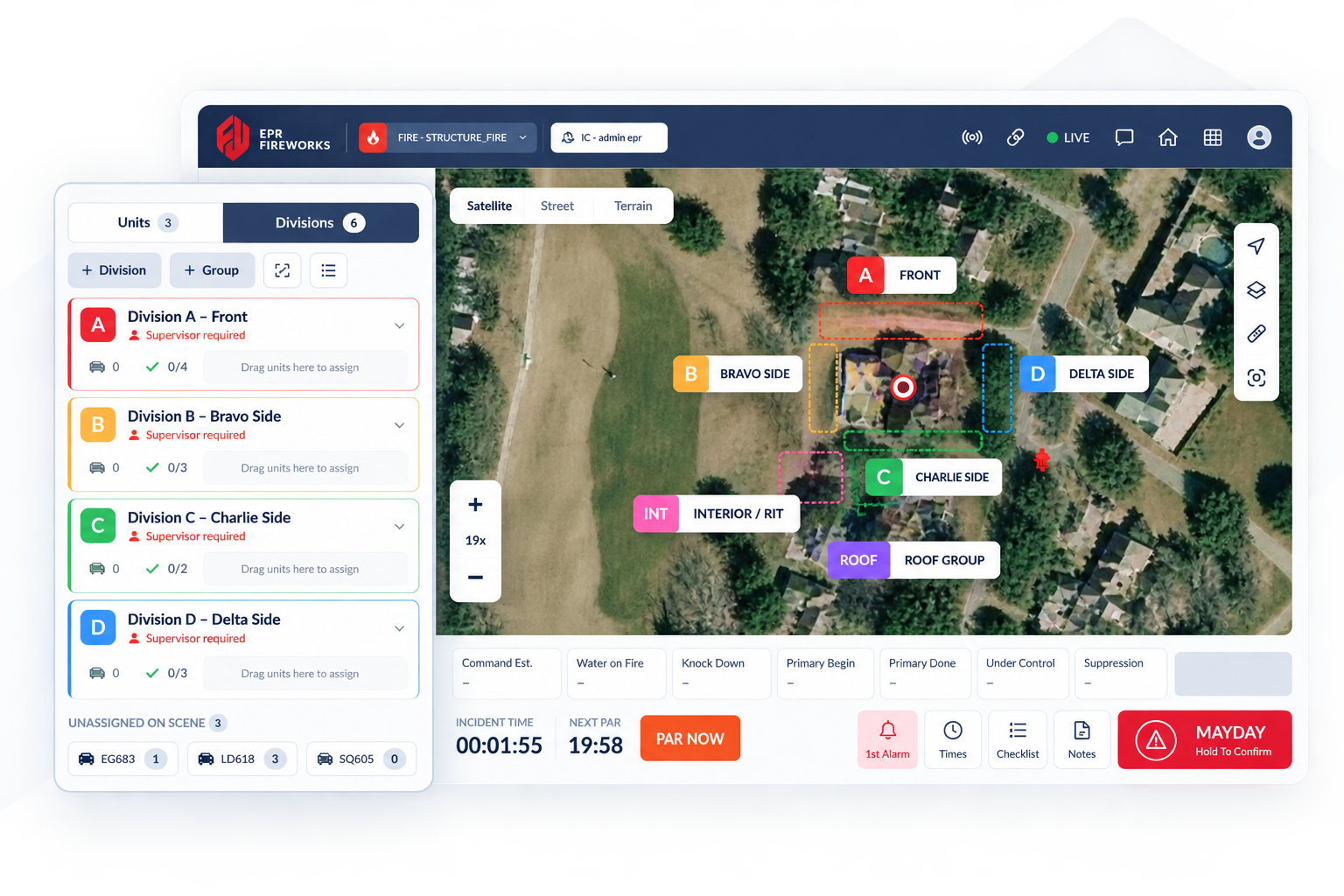
A digital board keeps the same picture on a shared screen. Units, divisions and groups, tasks, benchmarks and PAR all sit on one board. Every change shows on every connected device, and each action carries a time and a name.
In Fireworks, Incident Command is an add-on to Fireworks Incidents. It opens from the incident you are already on, from the incident list or the incident's menu. There is no second login.
Why Do Fire Departments Still Trust the Whiteboard?
Be fair to the whiteboard. It has earned its place on the apparatus. Any replacement has to match what it does well.
It Never Needs Power or a Signal
A whiteboard has no battery and no network. It works in a basement garage, a rural road or a storm. Nothing has to load before you start.
Everyone Already Knows How to Use It
Officers learn the board in their first acting shifts. A magnet in a column means one thing to everyone. There is no menu to learn under stress.
The Tactical Worksheet Fills the Gaps
Many departments pair the board with a paper tactical worksheet. It holds benchmark times, PAR times and notes. It is simple, cheap and easy to carry from rig to rig.
Where It Falls Short
The whiteboard holds the picture, but it does not keep a history. Once a magnet moves, the old position is gone. After the call, someone rebuilds the timeline from memory, radio traffic and the tactical worksheet.
How Does a Whiteboard Compare to a Digital Board at a Working Fire?
Here is the same fire, moment by moment, on both kinds of board.
| Moment | Whiteboard | Digital board |
|---|---|---|
| Arrival | Write units as they report on the radio | CAD units appear under Unassigned; add any CAD missed |
| Assignment | Move magnets into division columns | Drag units into divisions set up by an incident-type template |
| PAR | Call each unit on the radio and tick it off | Crews answer on their own devices; re-ping who has not answered |
| Mayday | Radio traffic and a marker on the board | Alarm on every device and an automatic PAR |
| Transfer of command | Face-to-face briefing at the board | One-tap transfer, ICS 201 briefing, logged request |
| The report | Rebuild times from the worksheet | Benchmarks and actions written into the incident report |
Arrival
On a whiteboard, Command writes each unit down as it reports. On the digital board, units dispatched in CAD appear on their own. Command adds any unit CAD missed, including mutual aid.
Taking command can apply an incident-type template. The built-in templates follow NERIS incident types. They set up divisions, groups and the checklist, so the board is ready in seconds.
Assignment
Moving a magnet and dragging a unit feel much the same. The difference is what happens next. On the digital board, the unit moves on every device and on the map.
Command also logs benchmarks with one tap, such as Sizeup, Water on Fire, Knock Down and Under Control. Each tap records the time. Nobody has to write it down while the fire grows.
Accountability (PAR)
A whiteboard PAR runs over the radio, one unit at a time. Command ticks off each answer by hand. A missed unit is easy to lose in the noise.
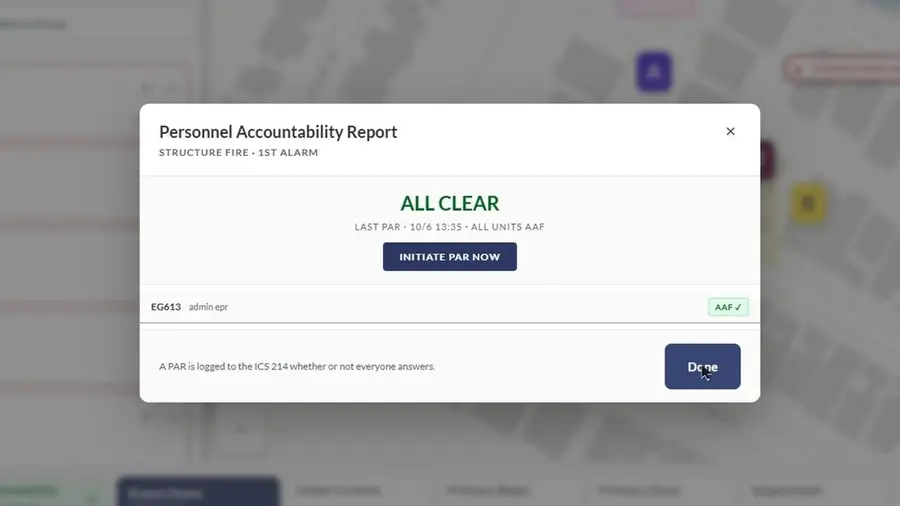
On the digital board, firefighters answer a PAR from their own device. Command re-pings any unit that has not answered. When every unit is accounted for, the PAR reads All Clear.
Every PAR is logged to the ICS 214, whether or not everyone answers. That record exists even when the roll call goes badly.
Mayday
During a Mayday, the whiteboard depends on Command hearing the call and marking it. On the digital board, the alarm reaches every device. A PAR for every assigned unit starts at once.
The unit and its division turn red on the board and the map, with a running clock. Anyone who can edit the board can declare a Mayday. Only Command can resolve it.
Transfer of Command
With a whiteboard, the incoming officer stands at the board and gets a briefing. That still matters. A digital board adds a printed ICS 201 briefing and a clean handoff.
The outgoing commander selects the incoming officer and transfers command. An officer can also request command, and Command has 60 seconds to allow or deny. Every request, answer and takeover is recorded in the activity log.
The Report Afterward
After a whiteboard fire, the board gets wiped. The times live on the worksheet, if anyone kept it. The records officer then types everything into the report.
The digital board prints an ICS 214 Activity Log in the FEMA layout, with NERIS benchmark timestamps. It also prints an After-Action Report with rule-based insights. You can compare the output with FEMA's ICS 214 form.
Reports can be printed at any time during the incident, not only at the end. The activity log stays searchable, so a training officer can review the call later.
What Changes When the Board Is Connected to the Incident Record?
A digital board on its own is a better whiteboard. A board connected to the incident record changes the work after the call. That is the idea behind one incident, one record.
Less Re-Entry for the Records Officer
When Command completes the incident, the board writes into the incident report. That covers benchmark timestamps, completed tactical actions mapped to NERIS codes, and rehab entries. It never overwrites what the records officer already entered.
That means the records officer reviews and finishes the report instead of starting from a blank page. The times in the report are the times Command tapped on scene.
Accountability Before Close
Command cannot complete the incident quietly with people unaccounted for. An open Mayday or missing personnel is flagged first. Any override is recorded in the activity log.
One Platform, Including Mutual Aid
Mutual-aid crews can join with a time-limited guest code, valid for 4, 8, 12 or 24 hours. They get Responder or View only access and need no Fireworks account. Guests cannot take command or print reports.
Departments already on Fireworks can set up standing partnerships instead. Either way, everyone works from the same board. Learn more on the Incident Command solution page.
It Still Works When the Signal Drops
The main fair point for whiteboards is power and signal. The digital board works offline and syncs when the device reconnects. Touch Mode makes controls large enough for gloved hands.
Frequently Asked Questions About Digital Incident Command Boards
Does a digital incident command board replace radio?
No. Radio stays the main voice channel on the fireground. The board records what is assigned, answered and logged.
What happens if the network goes down?
The board keeps working offline. Changes are queued and sync when the connection returns.
Can a mutual-aid department without Fireworks join the board?
Yes. Command shares a time-limited guest join code. Guests get Responder or View only access and need no account.
Does the board track firefighters inside the building?
No. There is no in-building tracking and no SCBA monitoring. Devices can share their location on the map.
Take the Next Step Toward One Incident, One Record
The whiteboard taught the fire service how to run a scene. A connected digital board keeps that habit and adds the record. Command stays in control, and the report is already started when the call ends.
See how Incident Command works inside Fireworks, or schedule a call to see the board on your own incidents.