Every fire department operates differently, yet many software vendors use “customizable” as a buzzword without delivering real flexibility.
- Truly customizable fire department software lets you configure workflows, forms, reports, and user permissions to match your department’s specific operational requirements.
- Key customization areas include incident reporting fields, dashboard layouts, automated alerts, and integration with existing CAD or billing systems.
- Look beyond marketing claims by requesting demonstrations of actual configuration capabilities before committing to any platform.
When evaluating fire department records management solutions, prioritize vendors who can show you exactly how their system adapts to your workflows rather than forcing you to adapt to theirs.
Why Does “Customizable” Mean Different Things to Different Vendors?
Fire service technology has evolved dramatically over the past decade. According to the U.S. Fire Administration, departments nationwide are increasingly adopting digital solutions to improve response times, compliance reporting, and resource allocation. Yet the term “customizable” gets thrown around so liberally in software marketing that it’s practically lost all meaning.
Some vendors call their software customizable because you can change the color of your dashboard. Others mean you can add a single custom field to an incident report. Meanwhile, fire chiefs are looking for something far more substantial. They need configurable fire reporting tools that genuinely adapt to how their department operates, from volunteer scheduling peculiarities to mutual aid agreements to specialized rescue team requirements.
The disconnect creates real problems during procurement. Departments invest significant time and budget into systems that promise flexibility, only to discover that “customizable” meant something far more limited than expected. Understanding what genuine customization looks like helps you ask the right questions during the evaluation process.
What Should Customizable Fire Department Software Actually Include?
Genuine customization in a fire RMS extends across multiple functional areas. A custom fire RMS should let your department control how data flows through the system, who sees what information, and how reports get generated without requiring expensive development work or months of implementation time.
Form and Field Configuration
The foundation of any configurable fire reporting tool is the ability to modify data entry forms. Your department might track apparatus response times differently than the department two counties over. Maybe you need specific fields for industrial occupancy pre-plans that a rural volunteer department doesn’t require.
Meaningful form customization includes the ability to add, remove, or rename fields in incident reports. You should be able to create dropdown menus with values specific to your jurisdiction, such as local street types or occupancy classifications that matter for your response area. Conditional logic that shows or hides fields based on previous answers reduces data entry burden and improves accuracy.
Dashboard and Display Personalization
Different roles within your department need different information at their fingertips. Your fire prevention bureau chief cares about inspection compliance rates and violation trends. Your training officer needs visibility into certification expirations and attendance records. Your station captains want to see shift coverage and apparatus status.
A properly customizable fire department software platform allows each user role to configure their dashboard view. Rather than forcing everyone to look at the same generic homepage, the system should support multiple widget layouts, customized data views, and role-based default screens.
Workflow and Process Automation
Every department has its own approval chains, notification requirements, and process flows. When an incident report gets submitted, who needs to review it? Does your department require quality assurance checks before reports go to the state? How do you handle mutual aid billing documentation?
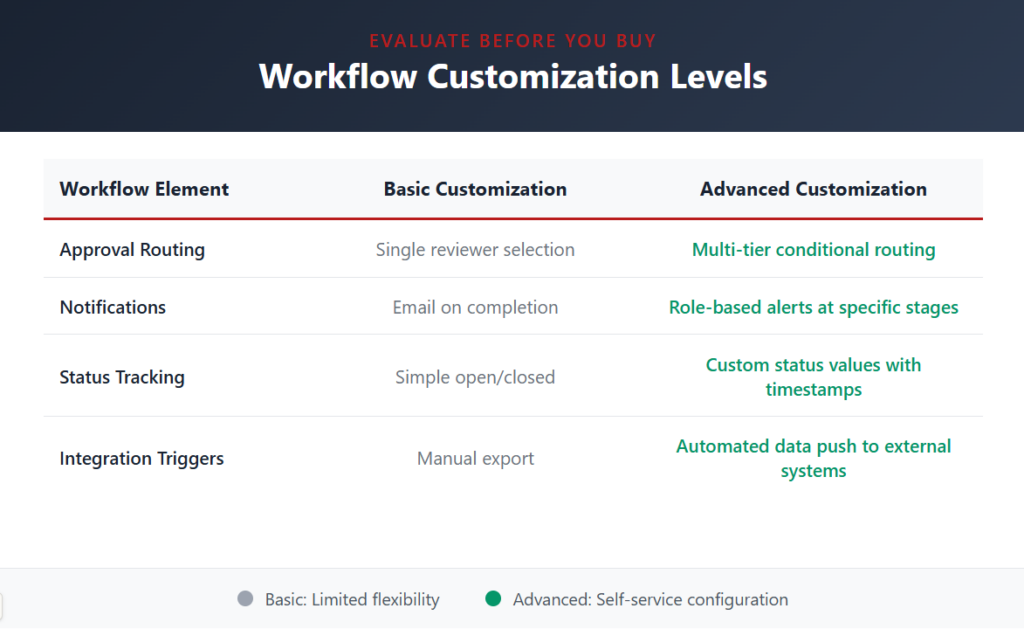
Genuine customization means you can build these workflows yourself through the administrative interface rather than submitting change requests and waiting weeks for the vendor to implement them.
How Do You Evaluate Customization Claims During the Sales Process?
Vendor demonstrations rarely show limitations. Sales teams present the most polished version of their product, often using demo environments loaded with ideal configurations. Getting past the marketing requires specific questions and hands-on testing.
Request a Configuration Walkthrough
Ask the vendor to show you exactly how an administrator would add a custom field to an incident report. Watch them navigate to the form builder, create the field, set validation rules, and deploy the change. Note whether this requires technical expertise or if someone with moderate computer skills could handle it.
If the sales representative deflects with statements like “our implementation team handles that” or “we’d need to scope that as a project,” consider it a red flag. Truly customizable fire department software puts configuration power in your hands, not theirs.
Test with Your Actual Requirements
Come to demonstrations with a list of specific customizations your department would need. Maybe you require a particular field for tracking patient contact information differently due to local privacy regulations. Perhaps you need to track apparatus pump hours in a specific format for your maintenance program.
Present these requirements and ask the vendor to show how their system would handle them. A configurable fire reporting tool should accommodate reasonable customization requests without requiring custom development.
Ask About Upgrade Compatibility
Here’s where many “customizable” platforms reveal their limitations. When you modify forms, add fields, or change workflows, what happens when the vendor releases a software update? Some systems overwrite custom configurations during upgrades, forcing you to rebuild everything. Others maintain your changes but struggle to incorporate new standard features into modified areas.
Truly customizable fire department software treats your configurations as first-class citizens within the architecture. Updates should preserve your customizations while still delivering new capabilities. Ask specifically how the vendor handles this scenario and request references from customers who have been through multiple upgrade cycles.
What Are the Five Essential Customization Features Every Department Needs?
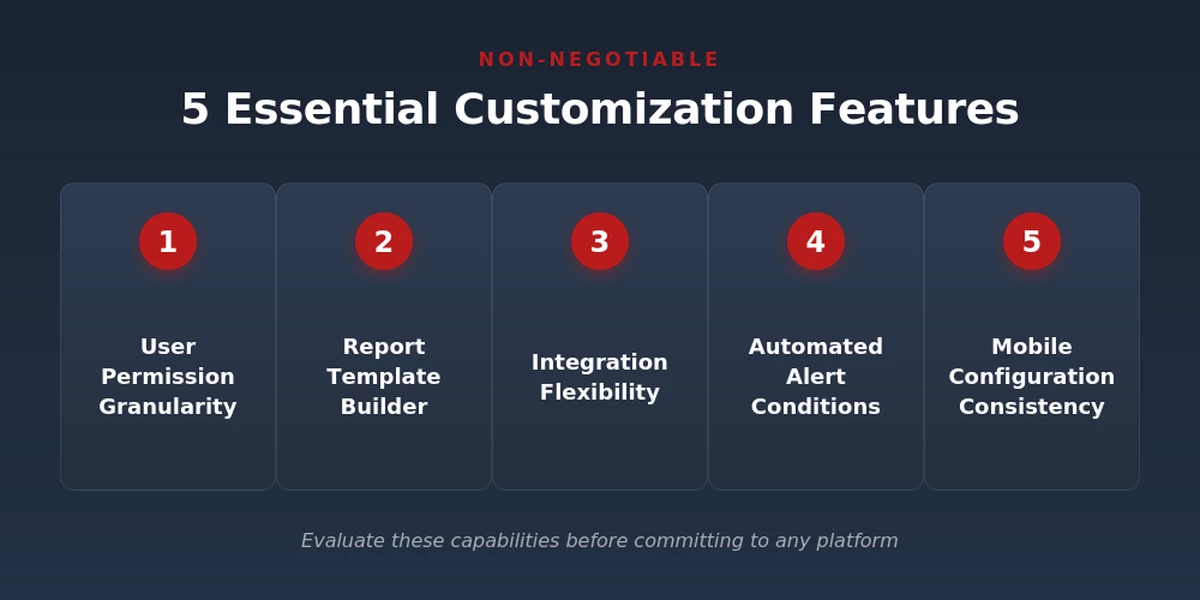
Certain customization capabilities consistently prove most valuable across fire departments of all sizes. The National Fire Protection Association emphasizes that effective fire service technology must align with each department’s unique operational requirements. These five areas should be non-negotiable when evaluating any fire department management system.
- User Permission Granularity
Your probationary firefighter shouldn’t have access to the same information as your administrative assistant or your deputy chief. Role-based permissions should extend beyond simple read/write access to include field-level security, feature visibility, and data scope restrictions.
- Report Template Builder
Pre-built reports rarely match exactly what your chief staff, city council, or state reporting agency requires. A robust report builder lets you design custom outputs pulling from any data in the system, with formatting options that produce professional documents without manual post-processing.
- Integration Flexibility
Your RMS doesn’t exist in isolation. It needs to communicate with your CAD system, your billing software, your GIS platform, and potentially your HR database for personnel tracking. Look for configurable integration capabilities that support multiple connection methods and allow field mapping without vendor intervention.
- Automated Alert Conditions
Proactive notifications prevent problems before they escalate. When a training certification is approaching expiration, the system should alert both the individual and their supervisor. When hydrant inspections fall behind schedule, the prevention bureau should know. Customizable alert triggers tied to any data field enable this proactive management approach.
- Mobile Configuration Consistency
Whatever customizations you make on the desktop version should appear consistently in mobile applications. Some systems maintain separate configuration sets for different interfaces, creating confusion and data integrity issues. Unified configuration management ensures your custom fire RMS works identically regardless of how personnel access it.
What Questions Should You Ask Vendors About Their Configuration Philosophy?
Beyond specific features, understanding a vendor’s approach to customization helps predict long-term satisfaction. Some records management software providers view customization as a revenue opportunity, charging for every modification. Others build flexibility into their core product philosophy.
Questions That Reveal True Customization Capability
Consider asking vendors these specific questions during your evaluation. The answers tell you much about whether “customizable” represents genuine capability or marketing language.
- What percentage of customers use custom fields beyond standard options?
- How long does a typical form modification take from request to deployment?
- What customizations require vendor involvement versus administrator self-service?
- Do customizations impact system performance as they accumulate?
- How does your pricing model handle extensive customization use?
Vendors with truly configurable fire reporting tools answer these questions confidently with specific metrics. Those relying on customization as a buzzword tend to hedge or redirect the conversation.
How Does NERIS Compliance Affect Customization Requirements?
The transition from NFIRS to NERIS reporting requirements adds another layer to customization considerations. Departments need software flexible enough to accommodate the new data elements NERIS requires while maintaining any custom fields already in use for internal operations.
According to recent FEMA guidance, NERIS represents the most significant change to fire incident reporting in decades. Your customizable fire department software must handle both the expanded standard requirements and your department’s unique supplementary data needs without forcing an either/or choice.
| Reporting System | Standard Fields | Custom Field Handling |
| Legacy NFIRS-only | Fixed state requirements | Limited additions |
| NERIS-ready | Expanded federal standards | Full custom field support |
| Advanced configurable | Dynamic requirement adaptation | Unlimited custom layers |
The most forward-thinking platforms separate compliance fields from operational fields, allowing independent customization of each. This approach ensures you can meet state and federal reporting requirements while still capturing the specific data points your leadership team values.
Frequently Asked Questions
How much does customization typically add to fire RMS implementation costs?
Implementation costs vary significantly based on the platform architecture. Systems designed with self-service configuration often include unlimited customization in base pricing. Those requiring vendor involvement may charge hourly rates ranging from moderate to substantial for each modification. Always clarify whether customization capabilities are included or billed separately.
Can we customize our fire software after implementation is complete?
Reputable configurable fire reporting tools support ongoing modifications throughout your contract period. Your department’s needs evolve, and your software should evolve with them. Be cautious of platforms that lock configuration settings after initial setup or charge premium rates for post-implementation changes.
What happens to custom fields if we switch vendors later?
Data portability varies by platform. Before signing, understand exactly what data export options exist and whether custom field data can be extracted in standard formats. The best custom fire RMS solutions provide complete data exports including all custom fields in accessible formats like CSV or XML.
Do customizations affect software performance?
Poorly architected systems can slow down as customizations accumulate. Well-designed platforms handle extensive customization without noticeable performance impact. Ask vendors directly about performance benchmarks with heavily customized environments and request contact information for reference customers using extensive modifications.
Take the Next Step Toward Truly Flexible Fire Department Technology
Finding customizable fire department software that genuinely adapts to your operations requires moving beyond marketing claims to hands-on evaluation. The questions and criteria outlined here give your selection committee a framework for separating truly configurable platforms from those offering superficial flexibility.
EPR Fireworks delivers the deep customization capabilities fire departments need, with self-service configuration tools, NERIS-ready compliance, and a 25-year track record of adapting to individual department requirements. Schedule a personalized demonstration to see exactly how our platform would work for your unique operational needs.