
Key Takeaways
Fire prevention software has become the backbone for departments managing increasing incident volumes, regulatory complexity, and the transition from NFIRS to NERIS.
- The fire department software market continues rapid growth as departments prioritize digital transformation
- The most effective platforms integrate inspections, pre-planning, violation tracking, and compliance reporting within a unified system
- Mobile functionality, offline capability, and real-time data synchronization are no longer optional features
- Departments evaluating new software should prioritize systems designed specifically for fire service workflows rather than generic inspection tools
Before signing any contract, test drive the platform with your actual inspectors in the field to ensure it meets real-world operational demands.
Fire marshals and inspectors understand a fundamental truth about their profession: prevention work saves more lives than suppression ever could. Yet too many departments still rely on disconnected systems, paper-based processes, or generic software that fails to address the unique demands of fire prevention operations. The right software transforms how fire prevention bureaus operate, simplifying compliance and turning scattered data into actionable intelligence.
With the fire department management software market valued at $1.42 billion in 2024 and projected to grow at nearly 11% annually through 2033, vendors are rushing to capture market share. That flood of options makes identifying the top features to look for in fire prevention software more challenging than ever. This guide cuts through the marketing noise to help you evaluate what actually matters for your prevention program.
Why Identifying the Top Features to Look for in Fire Prevention Software Matters Now
The fire service landscape has shifted dramatically over the past several years. The U.S. Fire Administration reports that departments submitted over 30 million incident reports in 2023, reflecting both increased call volumes and expanding service responsibilities. Prevention bureaus bear the weight of this expansion, with inspection workloads growing alongside community risk reduction expectations.
The mandatory transition from NFIRS to the National Emergency Response Information System (NERIS) by 2026 adds urgency to software decisions. Departments selecting new platforms today need systems that meet current needs while preparing for enhanced data collection and near-real-time analytics that NERIS will require. Choosing the wrong platform now means another expensive transition within a few years.
Fire inspection software has evolved from simple checklist digitization to comprehensive operational platforms. By connecting prevention with suppression, modern solutions make sure inspections and pre-incident planning work hand in hand. To achieve this, departments must choose platforms with features that deliver real value rather than vendor padding.
What Should Fire Inspection Software Deliver for Field Personnel?
The people actually using fire inspection software daily deserve tools that simplify their work rather than adding complexity. Field inspectors spend hours each week navigating buildings, documenting conditions, and communicating with property owners. Software should accelerate these tasks without requiring constant attention to the device.
Mobile-First Design and Offline Functionality
Inspectors work in basements, mechanical rooms, and rural properties where connectivity disappears completely. Any serious fire inspection software must function fully offline, syncing data automatically once connectivity returns. This means capturing photos, completing checklists, documenting violations, and even generating preliminary reports, all without relying on cellular or WiFi signals.
Touch-optimized interfaces matter equally. Inspectors wear gloves, carry equipment, and often work in awkward positions. Software designed primarily for desktop use and adapted for mobile creates frustration. Look for platforms built specifically for field use with appropriately sized buttons, intuitive navigation, and minimal typing requirements.
Customizable Inspection Checklists and Code Integration
Every jurisdiction adopts different fire code editions and local amendments. Effective platforms allow inspection checklists to reference specific code sections adopted locally—such as IFC, NFPA 1, or state-specific requirements. When inspectors document violations, the software should automatically link appropriate code citations, eliminating manual lookup and reducing errors.
Customization extends beyond code references. Different occupancy classifications require different inspection focuses. A high-rise office building inspection differs substantially from a restaurant inspection or an assembly occupancy review. Templates should adapt to these variations while maintaining consistent data collection standards across your prevention bureau.

How Should Community Risk Reduction Software Support Your CRR Program?
Prevention extends far beyond inspections. The USFA defines community risk reduction as a strategic, integrated approach aimed at lowering both the frequency and impact of local risks within communities. To support these efforts, software must be able to gather and link diverse data sources, transforming information into clear insights that drive an effective CRR strategy.
Risk Assessment and Analytics Capabilities
Understanding where risks concentrate in your community requires analyzing multiple data streams. Effective community risk reduction software correlates inspection histories, incident patterns, demographic data, and property characteristics to identify high-priority areas. These analytics should move beyond simple dashboards to provide actionable recommendations for resource deployment.
Standards today recommend periodic community risk assessments, but modern platforms make continuous monitoring possible. Real-time analytics identify emerging patterns before they become tragedies, such as increased violations in certain occupancy types or a geographic clustering of fire incidents.
| CRR Component | Software Support Required |
| Risk Assessment | Integrated analytics, GIS mapping, trend identification |
| Public Education | Community engagement tracking, outreach documentation |
| Engineering | Pre-plan integration, building systems data |
| Enforcement | Inspection scheduling, violation tracking, compliance reporting |
| Emergency Response | Shared data with suppression operations, dispatch integration |
Community Engagement Documentation
Progressive departments track public education contacts, smoke alarm installations, community event participation, and safety visits to vulnerable populations. This documentation supports grant applications, demonstrates program effectiveness, and identifies which outreach strategies produce results. Look for platforms that integrate community engagement with inspection activities rather than requiring separate systems.

What Capabilities Does Effective Fire Pre-IncidentPlanning Software Require?
Pre-incident planning and fire prevention share a symbiotic relationship. Inspectors observe building conditions that crews need to be aware of during emergencies. Emergency responders identify hazards that prevention personnel should address. Software must facilitate this bidirectional information flow.
Integrated Pre-Plans and Inspections
When an inspector updates a building’s occupancy classification, adds hazmat storage information, or documents a sprinkler system modification, that data should immediately appear in pre-plans accessible to responding crews. Similarly, when suppression personnel conduct pre-plan surveys and identify access issues or tactical considerations, prevention staff should see those notes during subsequent inspections.
This integration eliminates duplicate data entry while ensuring both prevention and operations work from current information. As documented in research on essential RMS software capabilities, the connection between suppression and prevention data creates substantial operational advantages.
GIS Mapping and Visualization
Modern fire pre planning software overlays property data on geographic information systems, displaying hydrant locations, access routes, utility shutoffs, and hazard zones visually. During inspections, personnel can verify that documented information matches field conditions. During emergencies, responders have instant access to critical tactical information.
Mapping capabilities should extend beyond static overlays. Dynamic visualization showing inspection statuses across jurisdictions helps prevention managers identify overdue properties, prioritize inspections by risk level, and demonstrate coverage to elected officials and community stakeholders.
Hydrant Management Integration
Water supply information proves critical during fire operations, making hydrant management a key component of effective fire pre-planning software. Look for platforms that track hydrant locations, flow test results, maintenance histories, and out-of-service status all within the same system managing your inspection and pre-plan data.
If a hydrant goes offline or fails a test, pre-plan locations that may depend on it for fire suppression should be updated automatically.. Field personnel conducting inspections can verify hydrant conditions while on-site, keeping records current without requiring separate data entry into disconnected systems.
Nine Essential Capabilities When Evaluating Prevention Platforms
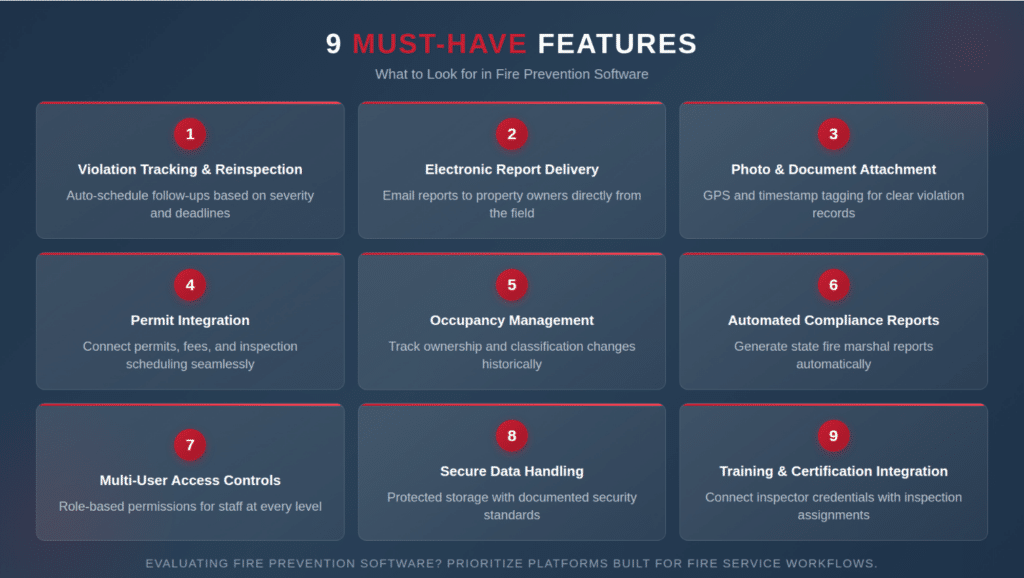
After reviewing dozens of platforms and speaking with prevention bureau leaders nationwide, certain capabilities consistently separate effective solutions from disappointing purchases. This listicle captures the top features to look for in fire prevention software:
- Violation Tracking with Reinspection Scheduling — Software should automatically schedule reinspections based on violation severity and correction deadlines, preventing properties from falling through the cracks.
- Electronic Report Generation and Delivery — Inspectors should complete inspections and email their reports to property owners before leaving the site, eliminating back-office processing delays.
- Photo and Document Attachment — Violations documented with photographs create clearer records and reduce disputes. Look for unlimited photo capacity with automatic GPS and timestamp tagging.
- Permit Integration — Prevention bureaus handling operational permits need software connecting permit issuance, fee collection, and inspection scheduling within unified workflows.
- Occupancy Management — Properties change ownership, occupancy classification, and contact information regularly. Platforms should track these changes historically while maintaining current data accuracy.
- Automated Compliance Reporting — State fire marshal offices require periodic activity reports. Effective software generates these reports automatically rather than requiring manual compilation.
- Multi-User Access Controls — Different personnel need different access levels. Administrative assistants scheduling inspections need different permissions than fire marshals reviewing enforcement actions.
- Secure Data Handling — Inspection records contain business information and sometimes personal data. Ensure platforms meet appropriate security standards and provide documented data protection practices.
- Training and Certification Integration — Prevention personnel require ongoing certifications for inspector credentials, code updates, and specialized occupancy training. Platforms connecting training records with inspection assignments ensure only properly certified inspectors conduct specific inspection types, reducing liability and maintaining program credibility.

How Do Modern Platforms Support Regulatory Compliance?
The regulatory environment facing fire prevention bureaus grows more complex annually. Beyond local fire codes, departments must address state licensing requirements, accessibility standards, environmental regulations, and industry-specific codes for healthcare, educational, and industrial occupancies.
NERIS Compatibility and Transition Support
With NERIS replacing NFIRS by 2026, platform selection should consider transition readiness. Systems already compatible with NERIS V1 standards reduce transition friction and position departments for enhanced analytics capabilities the new system will provide. Ask vendors specifically about their NERIS readiness and timeline for full compliance.
| Regulatory Requirement | Software Capability Needed |
| NERIS Reporting | API integration, enhanced data fields, near-real-time submission |
| State Fire Marshal Reports | Automated report generation, configurable data exports |
| NFPA 1730 Compliance | Workload tracking, performance metrics, resource documentation |
| ISO Inspections | Inspection coverage documentation, deficiency tracking |
| Grant Documentation | Activity reports, outcome measurement, compliance verification |
Audit Trail and Record Retention
Inspection records may be requested years after completion during litigation, insurance investigations, or regulatory audits. Platforms must maintain complete audit trails showing who documented what and when, with records stored securely for appropriate retention periods. Cloud-based systems typically handle long-term storage more reliably than locally-hosted solutions.

What Integration Capabilities Should You Prioritize?
Prevention software never operates in isolation. Departments use computer-aided dispatch systems, billing platforms, GIS services, and various other specialized tools. The best platforms connect with these existing systems rather than creating isolated data silos.
CAD and Dispatch Integration
When emergencies occur at properties with inspection histories or documented violations, responding crews benefit from that information immediately. Integration with dispatch systems can push relevant prevention data to apparatus mobile computers before crews arrive on scene, improving situational awareness and tactical decision-making.
Open APIs and Data Portability
Vendor lock-in creates long-term problems when departmental needs change or better solutions emerge. Platforms offering documented open APIs and standard data export formats provide flexibility for future integration needs. Ask potential vendors about data portability before signing contracts. Understanding how your data can be extracted if you change platforms protects your investment in records.
What Questions Should You Ask During the Evaluation Process?
Before committing to any platform, prevention bureau leaders should conduct thorough due diligence. Request demonstrations using your actual inspection workflows rather than canned vendor scenarios. Speak with reference customers in similar-sized jurisdictions facing comparable challenges.
Examine the vendor’s fire service experience specifically. Generic inspection software adapted for fire prevention typically lacks understanding of fire code nuances, operational workflows, and the connection between prevention and emergency operations. Companies with fire service backgrounds design platforms addressing actual department needs rather than assumed requirements.
Equally important is the quality of ongoing customer support. When your inspector encounters a software issue in the field or your administrator needs help generating a state-mandated report, response time matters. Ask reference customers specifically about support responsiveness and whether they reach knowledgeable personnel or generic call centers. The best vendors assign dedicated support contacts who understand your department’s configuration and can resolve issues without lengthy escalation processes.
Consider the total cost of ownership beyond initial licensing. Implementation support, training, ongoing maintenance, and potential customization all affect long-term expenses. Cloud-based platforms typically reduce internal IT burden but involve recurring subscription costs rather than one-time purchases.
FAQ
What is the difference between fire inspection software and fire prevention software?
Fire inspection software focuses specifically on documenting building inspections, tracking violations, and managing reinspection schedules. Fire prevention software encompasses broader functionality including community risk reduction activities, public education documentation, permit management, and integration with pre-incident planning. Most comprehensive platforms combine both capabilities within unified systems.
How long does implementing new fire prevention software typically take?
Implementation timelines vary based on department size, data migration complexity, and integration requirements. Small departments with limited historical data may complete implementation within four to six weeks. Larger agencies migrating extensive records from legacy systems often require three to six months for full deployment, including personnel training and workflow optimization.
Can fire prevention software work offline in areas without cellular coverage?
Quality platforms designed for fire service use include full offline functionality. Inspectors can complete inspections, document violations, capture photos, and generate reports without connectivity. Data synchronizes automatically when connectivity returns. This capability is essential for departments serving rural areas or conducting inspections in buildings with poor signal penetration.
Take Your Fire Prevention Program to the Next Level
Selecting fire prevention software represents a significant decision affecting your prevention bureau’s effectiveness for years to come. The top features to look for in fire prevention software all point toward one goal: enabling your personnel to protect your community more effectively while reducing administrative burden.
EPR Fireworks gives fire marshals and inspectors exactly what they need: inspection, risk reduction, and pre-incident planning tools—all in one system designed by fire service professionals. Are you ready to see how the right technology can transform your prevention operations? Schedule a call today to explore how EPR Fireworks supports departments like yours.

